Talking Tom Cat 2
- 4.3
- Rating
- 100.00M
- Installs
- Free
- Price

 Analysis by App-foxy
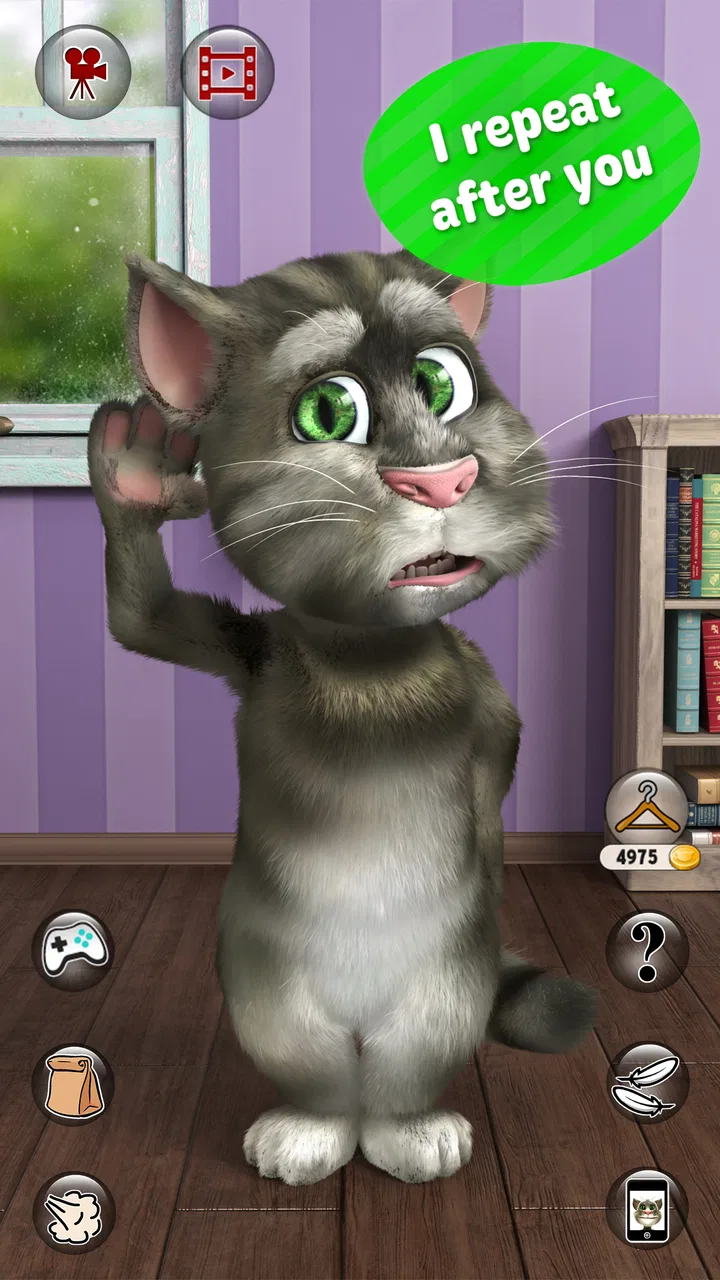
If you want a quick laugh rather than a deep game, Talking Tom Cat 2 is easy to understand within seconds. I tested it as a casual entertainment app, and its appeal is still very direct: Tom reacts to what you say and do, turning a short interaction into a small comedy routine. There is no complicated setup to learn, and the familiar character makes it approachable for children, families, and anyone who remembers the early talking-character apps.
That simplicity is also the key decision point. I would not choose it when I want a long campaign, a serious challenge, or a rich social experience. I would choose it when I have a spare minute, want to amuse a child, or feel like recording a silly reaction. Outfit7 Limited has kept the focus on immediate play, and that makes this free entertainment app more accessible than many larger mobile games.
What to consider before installing
The first question is what kind of entertainment you expect. This is an interactive character app, not a traditional puzzle game or an open-ended virtual world. You spend time with Tom, trigger reactions, and enjoy the results. The fun comes from experimenting with your voice and taps rather than from unlocking a long series of objectives.
You May Also Like

 AccuWeather: Weather Radar
AccuWeather Review: A Quick, Clear Forecast for Everyday Decisions
For everyday plans, the best forecast is the one you can understand quickly. AccuWeather makes rain timing, radar, and local conditions easy to act on, with a few trade-offs.

 Hill Climb Racing
Why Hill Climb Racing Still Turns Crashes Into One More Run
A tiny car, a bumpy hill and one more upgrade: Hill Climb Racing keeps resurfacing because its simple chaos makes every near-miss feel personal.

 AliExpress - Shopping App
AliExpress Makes Global Shopping Feel Personal, but Shoppers Bear the Risk
AliExpress turns a global marketplace into a pocket-sized discovery engine. Its reach is useful, its shopping loop compelling, and its trade-offs easy to miss.

 Lords Mobile: Kingdom Wars
Lords Mobile Is a Kingdom-Building Routine, Not a Quick Match
A case-by-case verdict on the building, battles, device demands, and social commitments that make Lords Mobile rewarding for some players and exhausting for others.

 PDF Scanner app - TapScanner
TapScanner Makes Paperwork Easier to Capture, Check, and Share
TapScanner makes scanning with a phone feel less like a rescue operation and more like a dependable step in getting work done. Its capture tools are useful, though not flawless.

 Block Blast!
Block Blast! Shows How Much a Puzzle Game Can Leave Out
A quiet grid game shows why puzzle players increasingly value instant clarity, repeatable skill and low-pressure play—and where the genre still needs to catch up.
More From Our News Desk
View All News


That makes the learning curve almost nonexistent. I could hand the device to someone unfamiliar with mobile games and explain the basic idea quickly. The age label is Everyone 10+, which is worth keeping in mind for households with younger children. Even when an app looks harmless, I prefer checking the age guidance and supervising children when they use a device, especially around optional purchases.
The app is free to download, but optional in-app items range from $0.99 to $24.99 each. That does not make the basic idea difficult to try, though it does mean I would review purchase controls before letting a child use it independently. A free starting point is useful here because the experience is highly personal: some people will enjoy the character immediately, while others may find the repeated reactions too limited after a few sessions.
Device compatibility is fairly broad. The current release is version 6.2.0.560 and requires Android 6.0 or later. I would still check the available space and the device’s general condition before installing, particularly on an older phone where animated apps can feel less responsive. The app has been around since August 22, 2011, so it is not a new experiment; it is a long-running character experience that has been refreshed over time.
Its scale is easy to see in the store: it has passed 100 million installs, with an average rating of 4.3 from around 3.4 million ratings and roughly 120 thousand written reviews. Those figures do not guarantee that you will enjoy it, but they do show that the format has remained recognizable and popular with a very large audience.
How the core interaction feels
My favorite part is the low-pressure rhythm. I say something, wait for Tom’s response, tap around, and decide whether the result is funny enough to repeat. This is not a game that asks me to memorize rules or protect a streak. It works better as a little toy than as a task list.
That distinction matters when comparing it with usual entertainment alternatives. A short-form video app gives you a constant stream of prepared content, while Talking Tom Cat 2 asks you to create the moment yourself. A conventional mobile game usually rewards progress, while this app rewards curiosity and timing. A messaging app lets you share a joke with another person, whereas Tom can provide a private, instant reaction even when nobody is available to chat.
I found that the best sessions were not necessarily the longest ones. A few minutes can be enough to record a funny exchange or show a friend how Tom responds. If I tried to make it my main source of entertainment for an evening, the limited interaction became more noticeable. The app is strongest as a repeatable pocket distraction, not as a complete replacement for games, videos, or conversation.
Small techniques that make it more enjoyable
One useful approach is to treat the app like a tiny performance tool. Instead of speaking random words, I try short phrases with different speeds, pauses, and tones. A pause before speaking can make the response feel more deliberate, while changing volume gives the interaction a different comic rhythm. This costs nothing and produces more variety than simply repeating the same sentence.
I also prefer using it in a quiet room when I want to test voice reactions. Background noise can make any voice-based interaction less satisfying, and a quiet setting makes it easier to tell whether the result came from my words, my timing, or my taps. This is a simple habit, but it helps me decide fairly whether I enjoy the app rather than blaming an unclear response on the character.
Another practical use is a quick icebreaker with children or relatives who are hesitant about a new phone. I can demonstrate one interaction, let them try their own voice, and then step back. That makes the app more inviting than handing someone a complicated game with menus and tutorials. It is particularly useful during a short wait at home or while traveling, when I want a shared activity that does not require a full group game.
For recording or sharing a moment, I would plan the line before starting. The humor is usually better when the phrase is short and the reaction is easy to understand. I would also preview anything before sending it to someone else, because a joke that works in the room may sound less amusing out of context. The app can create a quick clip or memory, but the quality of the result depends heavily on the person using it.
Where this app has an advantage
The clearest strength is immediacy. I do not need to build a profile, learn a complicated control scheme, or commit to a long session. That is a real advantage over larger games when I only have a few minutes. Tom’s recognizable personality also gives the experience more character than a generic soundboard or a random collection of reactions.
It is also a good fit for people who enjoy playful repetition. Some apps become boring because their main action is slow or demanding; here, the basic interaction is available right away. I can use it alone, demonstrate it to someone else, or return to it after a long break without needing to remember where I left off.
The entertainment category is important too. This is not pretending to teach, organize, or solve a practical problem. I appreciate that clarity. When I open it, I know I am looking for a brief smile rather than productivity. For families, that straightforward purpose can make it easier to decide when it belongs on a device and when another app would be more useful.
The long history of the product is another quiet benefit. The original Talking Tom Cat idea has been familiar for years, and this sequel keeps that recognizable character at the center. New users can understand it without knowing the earlier app, while returning fans may appreciate having the same basic style available in a more current release.
Where another type of app may suit you better
If your priority is progression, this will probably feel thin. A puzzle game, platform game, or story-driven title gives you goals to complete and skills to improve. Talking Tom Cat 2 is not the right choice for someone who wants increasingly difficult levels or a sense of achievement built over many hours.
It may also disappoint users seeking genuine conversation. Tom responds within the boundaries of a character app; he is not a friend, a tutor, or an intelligent assistant. If you want detailed answers, meaningful discussion, or help with a real task, a conversational tool is a better match. The charm here comes from performance and surprise, not understanding in the human sense.
Short-video platforms may be preferable when you want an endless supply of polished clips without doing anything yourself. On the other hand, those services can be more distracting and less controlled. I see Talking Tom Cat 2 as the better choice when I want to make a small joke myself, and video platforms as the better choice when I want passive viewing.
Parents should also think about the difference between a shared novelty and an unsupervised habit. A child may enjoy showing Tom to an adult, but repeated use can become less meaningful once the initial surprise fades. Because paid items are available, I would keep purchase authentication enabled and explain clearly that free installation does not mean every optional item is free.
Everyday scenarios where it makes sense
Imagine waiting for a takeaway order with a child who is becoming restless. I could open the app, invite the child to choose a funny phrase, and let Tom respond. The activity takes only a moment, does not require another player, and can end naturally when the order arrives. That is a better use case than expecting the app to fill an entire afternoon.
It can also work as a light social prompt at a family gathering. Someone can try a dramatic sentence, another person can change the timing, and everyone can compare the results. The app gives people something concrete to react to, which is useful when conversation has stalled. I would keep the volume moderate and avoid treating it as entertainment for people who clearly do not enjoy character apps.
For an adult user, the most realistic role is a tiny mood break. After finishing a routine task, I might spend a minute experimenting with a phrase and then close the app. That is where its design feels honest: it does not need to become a major hobby to be worthwhile. The trade-off is that its value depends on my willingness to play along.
What switching away would involve
The cost of switching to a different entertainment app is low because this experience does not depend on a long-term save, a complicated routine, or a large personal library. If I decide that Tom no longer holds my attention, I can move to a puzzle, a video app, or another character experience without losing a major investment of time.
That easy exit is helpful, but it also reveals the app’s weakness. There is not much pressure to return except the possibility of another amusing reaction. Users who need structured rewards may switch quickly, while casual users can keep it installed for occasional moments. I would judge it by how often I genuinely open it, not by the size of its install history.
There is also a practical switching question around purchases. Since optional items can cost from $0.99 to $24.99, I would avoid buying anything until I know that the basic interaction has lasting appeal. If a child uses the device, I would make the purchase decision an adult responsibility rather than allowing impulse taps. That approach keeps the free entry point useful without turning a small entertainment app into an unexpected expense.
My recommendation for different users
I recommend it to anyone who wants a friendly, uncomplicated character app for short bursts of amusement. It is especially suitable for people who enjoy voice-based jokes, families looking for a quick shared distraction, and returning fans of Talking Tom-style entertainment. The broad Android support also makes it a practical option for users who are not carrying a new phone.
I would skip it if I need a substantial game, a serious learning tool, an assistant that understands complex requests, or a social platform with ongoing interaction. I would also avoid making it a child’s completely unsupervised source of entertainment simply because the basic download is free. The age guidance and optional purchases deserve a quick conversation before regular use.
My final view is positive but specific: Talking Tom Cat 2 works best as a playful pocket toy, not as an all-purpose entertainment replacement. Outfit7 Limited has built an app that is easy to start, easy to demonstrate, and easy to leave when the moment is over. Its limitations are the same qualities that make it accessible, so the right decision depends on whether you value instant character reactions more than depth.
If that sounds like the kind of small interaction you would actually use, the free download makes trying it a sensible choice. I would install it, test the voice and tap interactions in a quiet setting, and decide after several short sessions rather than expecting a full-length game. For me, that is the fairest way to appreciate Talking Tom Cat 2: as a simple, familiar source of quick laughs with enough personality to earn a place on the phone, provided I keep my expectations—and optional spending—under control.
FAQs for Talking Tom Cat 2
01What are the main features of Talking Tom Cat 2?
Talking Tom Cat 2 offers a range of entertaining features, including the ability to repeat what you say in a funny voice, interactive mini-games, and the option to customize Tom with various outfits and accessories. The app also allows you to record videos of your interactions with Tom and share them with friends.
02Is Talking Tom Cat 2 suitable for children?
Yes, Talking Tom Cat 2 is designed to be family-friendly and suitable for children. The app features playful interactions and animations that are engaging for young users. However, parents should be aware of in-app purchases and ads, which can be restricted through device settings to ensure a safe experience for kids.
03Does Talking Tom Cat 2 require an internet connection to play?
While Talking Tom Cat 2 can be enjoyed offline, an internet connection is necessary for certain features, like accessing in-app purchases, viewing ads for rewards, and sharing videos on social media. Playing offline will limit some functionalities, but the core features remain accessible.
04Are there any in-app purchases in Talking Tom Cat 2?
Yes, Talking Tom Cat 2 includes in-app purchases that allow users to buy additional coins, outfits, and accessories for Tom. While the app is free to download, these optional purchases can enhance the gameplay experience. Users can disable in-app purchases in their device settings if they prefer.
05What are the system requirements for Talking Tom Cat 2?
Talking Tom Cat 2 is available for both Android and iOS devices. For Android, it requires version 4.4 and up, while iOS devices need to run on iOS 9.0 or later. Ensure your device meets these requirements for optimal performance and access to all features.
Pros
- Engaging animations and voiceovers.
- Intuitive user interface for all ages.
- Variety of mini-games included.
- Regular updates with new features.
- Free to download with optional in-app purchases.
Cons
- Contains ads that can interrupt gameplay.
- In-app purchases can be costly.
- Requires internet for some features.
- May drain battery quickly during use.
- Limited educational value for children.

Talking Tom Cat 2
Gallery